St Christopher's Catholic Primary Academy Logo

St Christopher's Catholic Primary Academy

Love One Another

  • About Us
    • 8-2-6 Club
    • Admissions
    • Charities
      • Good Shepherd Ministry
      • Save The Children
    • Department of Education
    • Equality Objectives
    • Financial Benchmarking
    • Gender Pay Gap Summary
    • Governance
    • School Calendar
    • Inspection Reports
    • PE and Sports Premium
    • Policies
    • Promoting British Values
    • St Gabriel the Archangel CMAT
    • Pupil Premium
    • Religion & RE
    • Results
    • 3 year Results Trend
    • School’s Ethos & Values
    • School Hours
    • SEND
    • Staff
    • Staffordshire LA
    • Vacancies
    • Virtual School Tour
    • Working Together to Safeguard Children
  • Catholic Life and Mission
  • Parents
    • Attendance
    • Class Pages
      • Reception
      • Year 1
      • Year 2
      • Year 3
      • Year 4
      • Year 5
      • Year 6
    • Extra Curricular
      • Adult Choir
      • Choir
      • Musical Theatre
      • Extracurricular Clubs
    • Help your child with maths
    • Home Learning
      • Active Learn Primary
      • AlfieCloud
      • BBC Bitesize
      • First News
      • Jessica
      • KS2 Spelling Words
      • My Maths
    • Letters Home/Newsletters
    • National Curriculum
    • Privacy Notice for Parents/Carers
    • School Council
    • School Dinners
      • Breakfast and Brunch Menu
      • Menus
    • Arbor
    • Parents & Carers Guide to the SEND Code of Practice
    • Uniform
    • Term Dates
    • Term Dates 2026-2027
  • Staff
  • Curriculum
    • Curriculum Overview
    • Early Years
    • Phonics & Early Reading
    • English Curriculum
    • R.E Curriculum
    • Maths Curriculum
    • Science Curriculum
    • History
    • Geography
    • Art
    • Design and Technology
    • Music Curriculum
    • P.E. & Games
    • PSHE & RHE
    • Computing / IT
    • Modern Foreign Languages – French
  • COVID-19
    • COVID Contingency Plan
    • Living with COVID Risk Assessment
    • 826 Club Risk Assessment
    • Catch-up Curriculum
    • Remote Learning Policy
    • Remote Education
  • Safeguarding & Wellbeing
    • Safeguarding
    • Wellbeing
    • Mental Health Work Booklet for Families
  • Contact Us
St Christopher's Catholic Primary Academy Logo
  • About Us
    • 8-2-6 Club
    • Admissions
    • Charities
      • Good Shepherd Ministry
      • Save The Children
    • Department of Education
    • Equality Objectives
    • Financial Benchmarking
    • Gender Pay Gap Summary
    • Governance
    • School Calendar
    • Inspection Reports
    • PE and Sports Premium
    • Policies
    • Promoting British Values
    • St Gabriel the Archangel CMAT
    • Pupil Premium
    • Religion & RE
    • Results
    • 3 year Results Trend
    • School’s Ethos & Values
    • School Hours
    • SEND
    • Staff
    • Staffordshire LA
    • Vacancies
    • Virtual School Tour
    • Working Together to Safeguard Children
  • Catholic Life and Mission
  • Parents
    • Attendance
    • Class Pages
      • Reception
      • Year 1
      • Year 2
      • Year 3
      • Year 4
      • Year 5
      • Year 6
    • Extra Curricular
      • Adult Choir
      • Choir
      • Musical Theatre
      • Extracurricular Clubs
    • Help your child with maths
    • Home Learning
      • Active Learn Primary
      • AlfieCloud
      • BBC Bitesize
      • First News
      • Jessica
      • KS2 Spelling Words
      • My Maths
    • Letters Home/Newsletters
    • National Curriculum
    • Privacy Notice for Parents/Carers
    • School Council
    • School Dinners
      • Breakfast and Brunch Menu
      • Menus
    • Arbor
    • Parents & Carers Guide to the SEND Code of Practice
    • Uniform
    • Term Dates
    • Term Dates 2026-2027
  • Staff
  • Curriculum
    • Curriculum Overview
    • Early Years
    • Phonics & Early Reading
    • English Curriculum
    • R.E Curriculum
    • Maths Curriculum
    • Science Curriculum
    • History
    • Geography
    • Art
    • Design and Technology
    • Music Curriculum
    • P.E. & Games
    • PSHE & RHE
    • Computing / IT
    • Modern Foreign Languages – French
  • COVID-19
    • COVID Contingency Plan
    • Living with COVID Risk Assessment
    • 826 Club Risk Assessment
    • Catch-up Curriculum
    • Remote Learning Policy
    • Remote Education
  • Safeguarding & Wellbeing
    • Safeguarding
    • Wellbeing
    • Mental Health Work Booklet for Families
  • Contact Us
St Christopher's Catholic Primary Academy Logo
  • About Us
    • 8-2-6 Club
    • Admissions
    • Charities
      • Good Shepherd Ministry
      • Save The Children
    • Department of Education
    • Equality Objectives
    • Financial Benchmarking
    • Gender Pay Gap Summary
    • Governance
    • School Calendar
    • Inspection Reports
    • PE and Sports Premium
    • Policies
    • Promoting British Values
    • St Gabriel the Archangel CMAT
    • Pupil Premium
    • Religion & RE
    • Results
    • 3 year Results Trend
    • School’s Ethos & Values
    • School Hours
    • SEND
    • Staff
    • Staffordshire LA
    • Vacancies
    • Virtual School Tour
    • Working Together to Safeguard Children
  • Catholic Life and Mission
  • Parents
    • Attendance
    • Class Pages
      • Reception
      • Year 1
      • Year 2
      • Year 3
      • Year 4
      • Year 5
      • Year 6
    • Extra Curricular
      • Adult Choir
      • Choir
      • Musical Theatre
      • Extracurricular Clubs
    • Help your child with maths
    • Home Learning
      • Active Learn Primary
      • AlfieCloud
      • BBC Bitesize
      • First News
      • Jessica
      • KS2 Spelling Words
      • My Maths
    • Letters Home/Newsletters
    • National Curriculum
    • Privacy Notice for Parents/Carers
    • School Council
    • School Dinners
      • Breakfast and Brunch Menu
      • Menus
    • Arbor
    • Parents & Carers Guide to the SEND Code of Practice
    • Uniform
    • Term Dates
    • Term Dates 2026-2027
  • Staff
  • Curriculum
    • Curriculum Overview
    • Early Years
    • Phonics & Early Reading
    • English Curriculum
    • R.E Curriculum
    • Maths Curriculum
    • Science Curriculum
    • History
    • Geography
    • Art
    • Design and Technology
    • Music Curriculum
    • P.E. & Games
    • PSHE & RHE
    • Computing / IT
    • Modern Foreign Languages – French
  • COVID-19
    • COVID Contingency Plan
    • Living with COVID Risk Assessment
    • 826 Club Risk Assessment
    • Catch-up Curriculum
    • Remote Learning Policy
    • Remote Education
  • Safeguarding & Wellbeing
    • Safeguarding
    • Wellbeing
    • Mental Health Work Booklet for Families
  • Contact Us

Arbor

What is the Arbor Parent Portal?

The Parent Portal, which can be accessed via the Arbor website or through the Arbor App, will allow you to do the following things:

  • Update your phone number, address and contact information
  • Give consent for photo, data, medical and other permissions for your child
  • Book parent consultations when they are available
  • See your child’s attendance
  • Make payments

The video below explains more about the Arbor app and how to log in. It includes details about all of the features, some of which we will not be using initially.

Logging In For The First Time

To login into the Parent Portal for the first time you will need the email that you will have received from school titled: “Welcome to Arbor”.

Alternatively, use the following link to open the Arbor login page

  • Click the “First time logging in” option in the bottom left corner.
  • Enter your email address. This must be the address the school has on record for you.
  • Click “Set Password”
  • Remember, you need to set up your Arbor parent account in a normal browser so that you can enter your child’s date of birth when the pop-up window appears.
  • Once you have set your password, you need to agree to the terms and conditions to proceed to your dashboard.
  • Once you have logged in, we recommend that you save the Arbor Log In page to your favourites or bookmarks, so you can access it easily in future.

On your first login only, you will need to enter your child’s date of birth to access the dashboard.

Download the Arbor app

To be notified of messages within the Arbor app, please turn on push notifications when prompted to do so when installing the app.

Go to your Play store and search for ‘Arbor’. Click the top option.
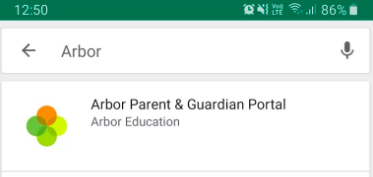
Screenshot_2021-05-12_at_09.24.12.png


Click Install to download the Arbor App. Once it has installed, click Open.
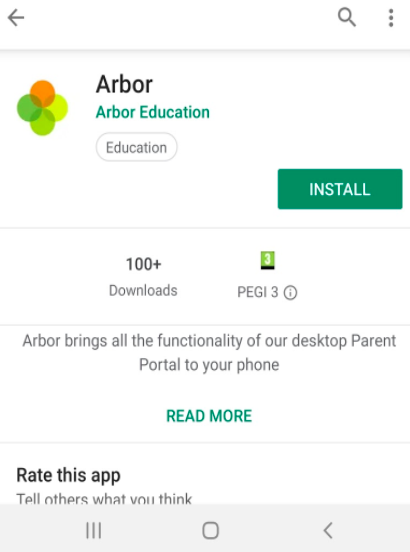
Screenshot_2021-05-12_at_09.27.31.png

Go to your App Store and search ‘Arbor’. Click the top option. Click Get to download the Arbor App.
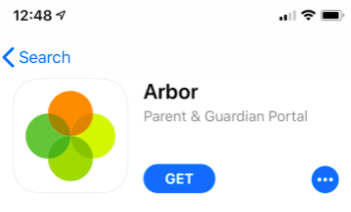
Screenshot_2021-05-12_at_09.28.23.png

  • Enter your email address.
  • Enter the password you set when you first registered. If you have forgotten your password, click ‘Forgot your password’ and enter your email address. You will then receive an email with a link to click to reset your password.

Being A Guardian For Multiple Children

If you are the Primary Guardian for more than one child in the school, you can access and view each child through the same portal by clicking on the name at the drop-down menu with the children’s names in the top-left of the home page, then change sibling.
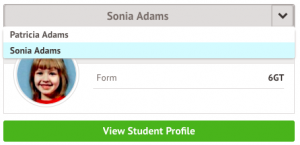
On doing this for the first time, you will need to enter your other child’s date of birth to access their dashboard.

Please see Arbor’s help centre here for more information.

If you need any further details, please contact the School Office.

Booking Parents Evenings

The Guardian Consultations section allows guardians to book time for Parents Evening meetings by selecting one of the available timeslotes.

In the case where no Parents Evening has been arranged, the section will state the below:
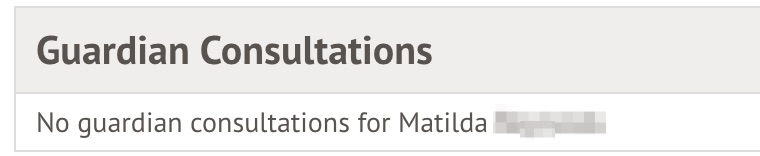
no_consultations.jpg

If a Parents Evening event has been created but the self-scheduling has not yet been enabled by the School yet, the dates of the parents evening will be shown with a note of when self-scheduling is available.
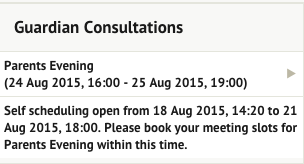
not_yet.png

When you can book an appointment, a notice appears within this same section. Once selected, you can choose the preferred time for a meeting with the school.

Screen_Shot_2019-05-21_at_08.42.51.png


Making payments


On the main Arbor page, you will see your child’s accounts.

Click an account to see more information, or top up e.g. click ‘Meals’.
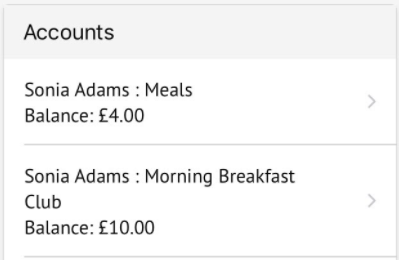
Screenshot_2021-05-19_at_15.27.32.png

Click the green button to top up the account by inputting your card details.
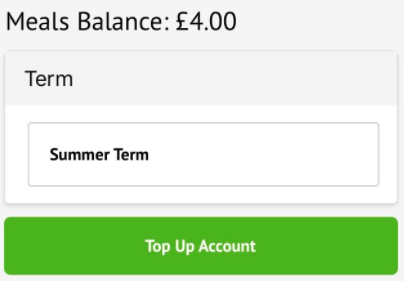
Screenshot_2021-05-19_at_15.28.32.png

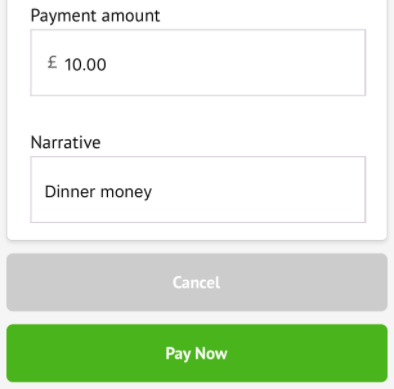
Input the amount to top up, then click to pay.

Top Tip: Can’t click the button? Follow this article: I can’t click the button to pay?
Screenshot_2021-05-19_at_15.29.23.png

Next, you’ll be able to input your card details. Please note that you must use a Visa or Mastercard, you will also have the option to pay via Apple Pay or Google Pay if using the Arbor App on your mobile phone.
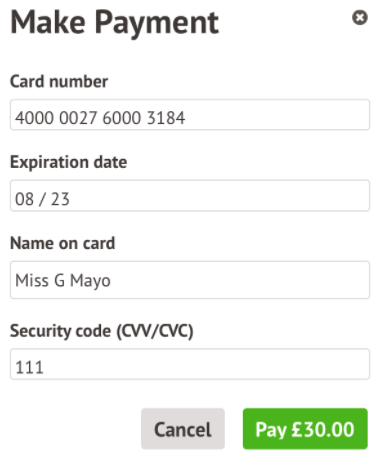
Screenshot_2021-05-19_at_15.30.00.png

You may have to then authenticate your identity for the payment to go through. This is a requirement of the recently introduced Strong Customer Authentication (SCA) regulations.

If authentication is needed for the payment, you will be prompted to authenticate the payment using the method of authentication your bank supports. This could be:

  • an SMS code
  • your mobile banking app

The payment will be completed and your card will be charged. You’ll see confirmation that the transaction has been successful.
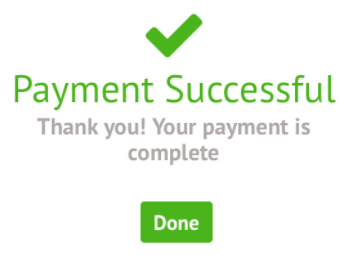
Screenshot_2021-05-19_at_15.32.24.png


To sign up for a club, click the menu icon at the bottom left of your screen. Select Clubs.
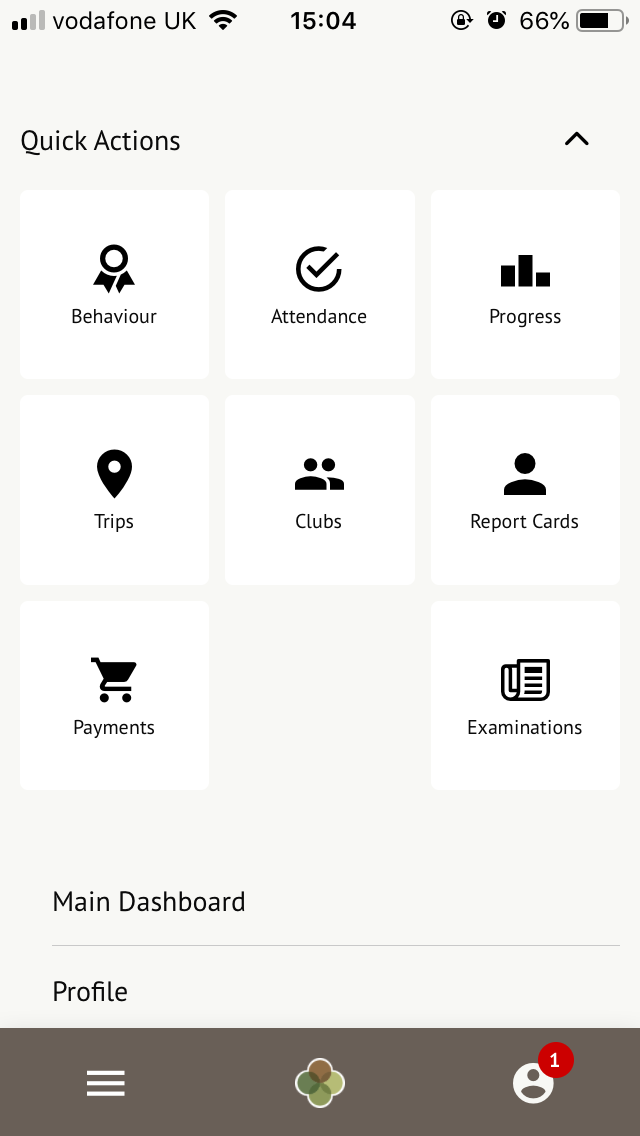
clubs_are_from_menu.png

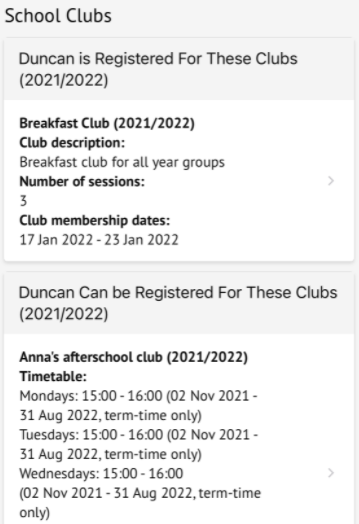
You can then see a list of any clubs the child is currently a member of and any clubs that are currently open for them to join.

Click on the club to open up that club’s information page.
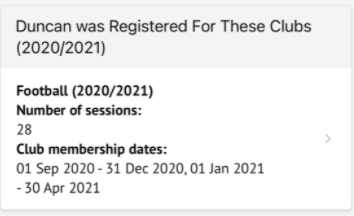
Screenshot_2022-01-17_at_17.03.35.png

Screenshot_2022-01-17_at_17.03.09.png

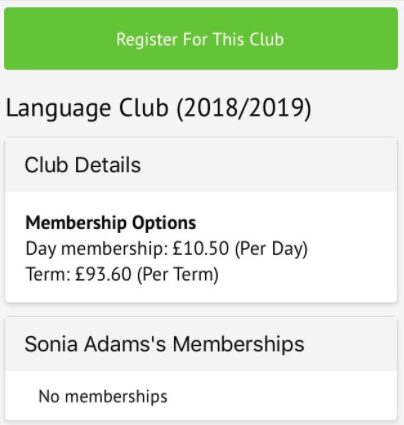
Click a club to access the Club Overview. Click Register For This Club to sign up.
Screenshot_2021-05-19_at_14.59.17.png

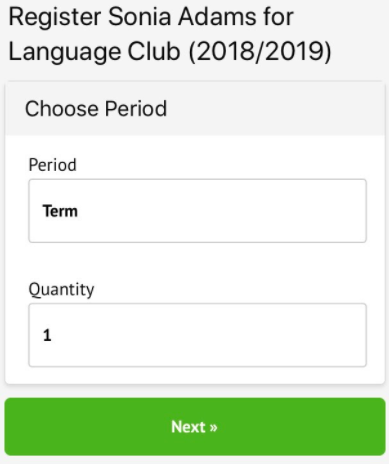
Next, select the period you would like to sign up for, then click Next.
Screenshot_2021-05-19_at_14.59.51.png

Select the period you would like to sign up for, then click Next.
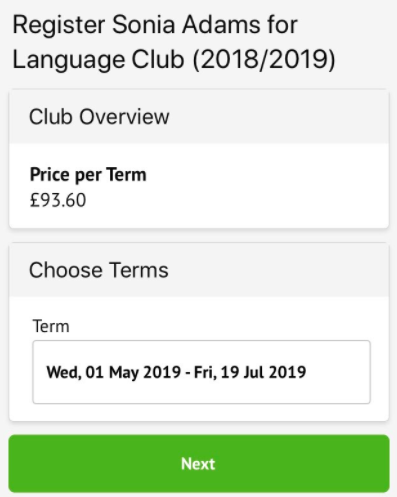
Screenshot_2021-05-19_at_15.00.30.png

On the next page, if no payment is required, you can simply sign up.
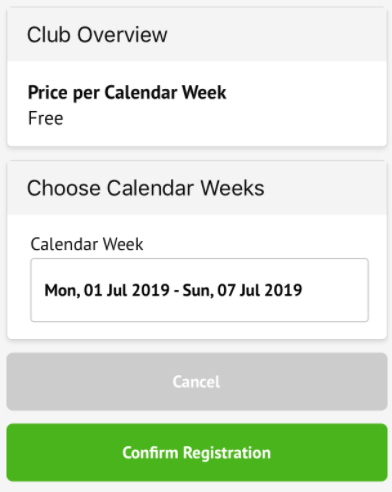
Screenshot_2021-05-19_at_15.01.15.png

If it is a club you have to pay for, you can input your card details to pay for the club.

Top Tip: Can’t click the button? Follow this article: I can’t click the button to pay?
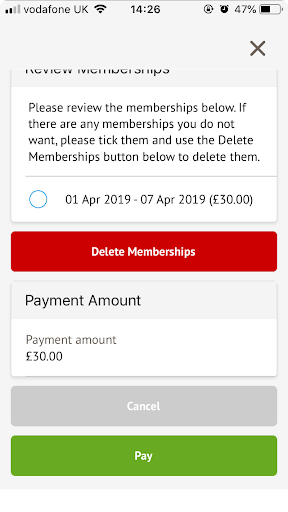
review_memberships.png

Please see Arbor’s help centre here for more information.

If you need any further details, please contact the School Office.

Parents

  • School Council
  • School Dinners
  • Maths Curriculum Y1 - Y6
  • Attendance
  • Help your child with maths
  • Letters Home/Newsletters
  • Arbor
St Christopher's Catholic Primary Academy
Wolverhampton Road
Codsall
Staffordshire
WV8 1PF

01902 297 820

[email protected]

SGA trust Logo

Part of St Gabriel the Archangel Catholic Multi-Academy Trust is a company limited by guarantee registered in England & Wales with company number 08146661. Registered office address: c/o Painsley Catholic College, Station Road, Cheadle, Staffordshire ST10 1LH.

School website powered by Realsmart Logo